Tutorial: Change Your Ipod Theme
 tvboxnow.com7 ?" B; s6 |" H tvboxnow.com7 ?" B; s6 |" H
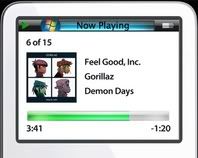
" |" l% N4 R! K- {( k( S4 iTVBNOW 含有熱門話題,最新最快電視,軟體,遊戲,電影,動漫及日常生活及興趣交流等資訊。This is what i will teach you, To make your Ipod Look like Windows Vistatvboxnow.com) W4 [7 N3 Q, s7 c: c) c' [7 j
tvb now,tvbnow,bttvb/ K$ ?0 }' Q. A5 ]) ?% G8 B* b
1. Download the Ipod Wizard from belowtvboxnow.com# X- d- J2 Z3 V# x
Link
9 Y' q6 x( n- ~) _tvb now,tvbnow,bttvb2. Download the iVista Theme from below" X7 N- j; k6 G3 J
Linktvboxnow.com! ?9 u, X) W( f
3. Make Sure you have NEWEST Ipod Updater installed into your computer (if not download it in Apple.com)
# {8 Y0 r5 S6 t- |* j) M4. Unzip Both Ipod Wizard and Windows Vista Theme into your DESKTOPTVBNOW 含有熱門話題,最新最快電視,軟體,遊戲,電影,動漫及日常生活及興趣交流等資訊。; Y9 s* B$ i3 }& \& O) R' m/ ?
5. Open Ipod Wizard and click OPEN UPDATER on the top and target it to your ipod updater (make sure you install Ipod Upadter First)
; A" l! l) N# x! r" x0 n2 T! S6. Next to the OPEN UPDATER button there should be a window that let you choose the Firmware of the ipod
" w! A0 M( T) G) x7. Select the 5th Genertation iPod 13.6.1.2tvboxnow.com- K/ G9 a) S5 i5 l' n) ^: x: N
8. Click Load Next to Firmware windowtvboxnow.com4 c! t& |+ B# x6 t' J% i, C
9. after you click load, click LOAD ALL in the bottom right part; ^8 k/ o, F" Z( z F1 Y
10. Target it to the folder where you unzip the THEME which should be on your destop
3 h6 {2 P' Q# d9 m E% P11. Click WRITE (it is next to the Firmware information box)tvboxnow.com, [" r1 G3 a5 _. V' {! t& E
12. Plug in iPod video
0 i% o; E+ I, N7 ~/ _$ \3 B# Qtvb now,tvbnow,bttvb13. Open Ipod Updater and DO NOT press Update or restoretvb now,tvbnow,bttvb9 m% P! H# t( k* q3 G
14. go back to Ipod Wizard and click DOWNGRADE FIRMWARE
! I2 b5 G* W8 I5 Q: b; N15. now go back to Ipod Updater and click UPDATE
% L+ u. F: _/ q. h' Y7 R' W
8 `# o3 l; Q# Z7 c! v8 u. V1 Byour Ipod Should reset and should look liek the picture above |


 發表於 2006-8-29 07:07 AM
|
發表於 2006-8-29 07:07 AM
| 